Docs / Get Started
WaxSong at a glance
A native macOS music player in the spirit of the classic 1999 desktop players — six skins, a lime 7-segment display, real tactile controls, and a GPU visualizer that moves with your music.
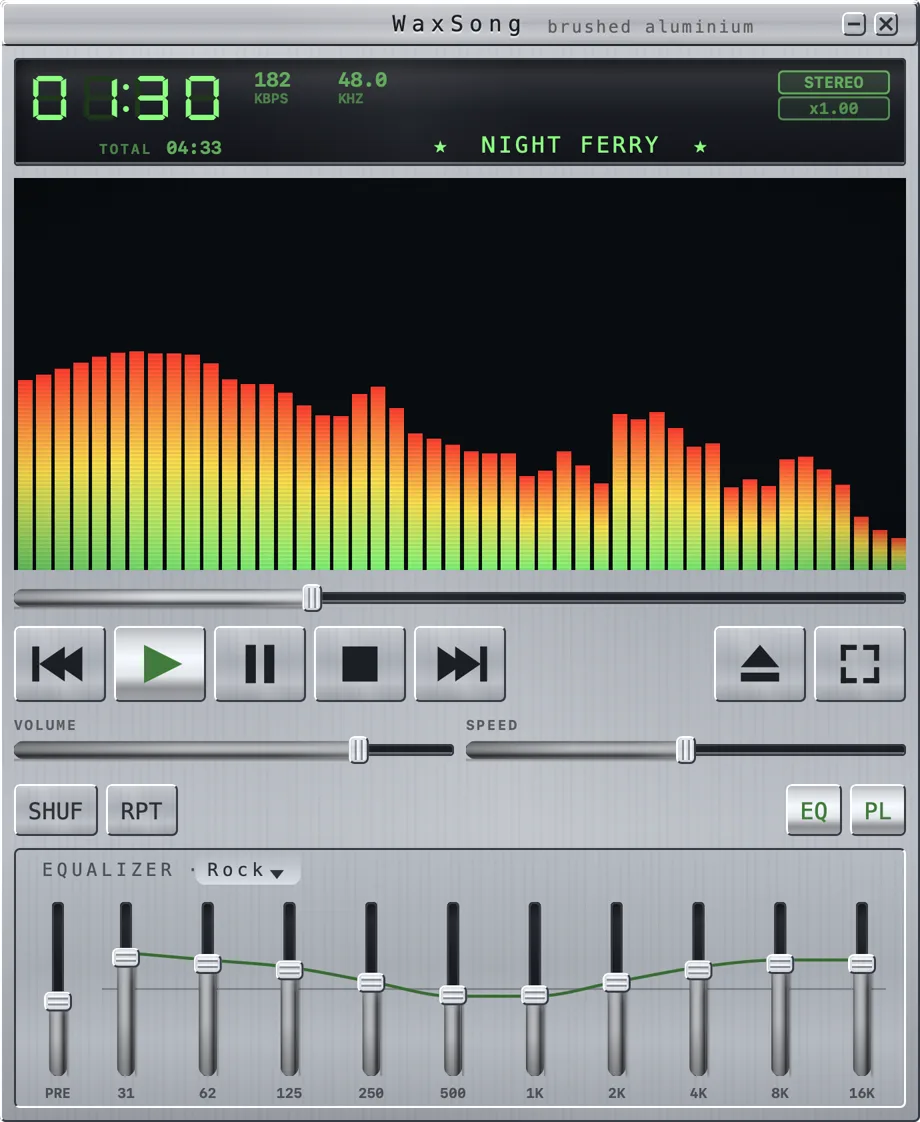
The player window
Top to bottom:
- Display — 7-segment elapsed time, bitrate and sample rate, stereo badge, playback speed, and the scrolling track name. Playback & the display ›
- Visualizer — seven real-time effects driven by the audio. Visualizers & fullscreen ›
- Seek bar and transport — previous, play, pause, stop, next, plus eject (open files) and fullscreen.
- VOL and SPEED sliders, and the SHUF / RPT mode buttons.
- EQ and PL — toggle the equalizer strip and the playlist window.
- The window resizes from any edge or corner, and nothing you put away leaves a gap behind it. Hide the effects area (⌘E) and the window shrinks by exactly that much, holding its top edge; hide the equalizer (⌘G) and the visualizer takes the height instead, so the window stays where it is.
What it believes
Your music should feel like it belongs to you. WaxSong plays your own audio files — no accounts, no streaming, no library to import into, no cloud. Everything runs on your Mac and nothing is collected.
Requirements
| macOS | 14 Sonoma or later |
|---|---|
| Hardware | Any Mac that runs Sonoma (the visualizer uses Metal, available on all of them) |
Next steps
- Open your music — four ways to get tracks playing.
- Skins — make it yours with ⌘1–⌘6.
- Keyboard shortcuts — the full reference.