Docs / Basics
Equalizer
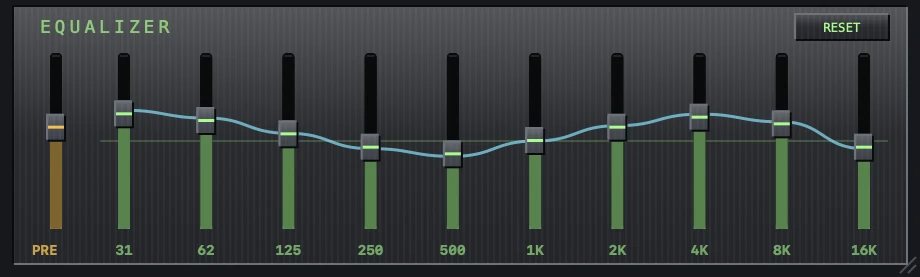
Ten bands, a preamp, and a live response curve — applied in the real audio graph, not a visual gimmick.
Using it
- Toggle the strip with ⌘G, the EQ button, or View → Toggle Equalizer. The window stays the size it is: the visualizer takes the height the strip gives up, and hands it back when the strip returns. What does change is how short the window can be dragged — with the strip away, a good deal shorter.
- PRE is the preamp: overall gain before the bands, useful when heavy boosts start to clip or quiet recordings need lift.
- The ten bands cover 31 Hz to 16 kHz in octave steps — drag a slider and the change is instant.
- To flatten everything, pick the Flat preset.
Presets
The strip's header names the curve that is on it — EQUALIZER · Rock. Move the pointer onto the strip and that name becomes a button; click it for the list.
Sixteen come with the app: Flat, then Rock, Pop, Dance, Electronic, Hip-Hop, Jazz, Classical, Acoustic, Vocal, then the corrective ones people reach for whatever they are playing — Bass Boost, Bass Cut, Treble Boost, Loudness, Headphones and Podcast. Each sets the ten bands and the preamp, so the boost-heavy ones keep some headroom instead of clipping.
Curves of your own
- Drag any slider and you have left the preset. The header says so — and it says what kind of custom it is: nudge the Rock curve and it reads Custom Rock, because where a curve came from is more use than a bare “Custom”.
- Drag it back to exactly where it was and the preset's own name returns.
- While the curve is your own, a SAVE button appears beside the name. Give it a name and it joins the bottom of the list.
- Saved curves outlive the session they were made in — they are still there after a relaunch, and after you have moved on to a different preset.
The header's controls are only there while the pointer is. At rest the strip just prints the name of the curve it is on, which is all it is when you are not changing it.
It remembers
The whole curve — bands, preamp and the name on the header — is part of your session and comes back exactly as you left it after a relaunch (Session restore).