Docs / Basics
Playlist
A dockable queue that shows what's playing, saves to standard M3U, and steps between the playlists in a folder.
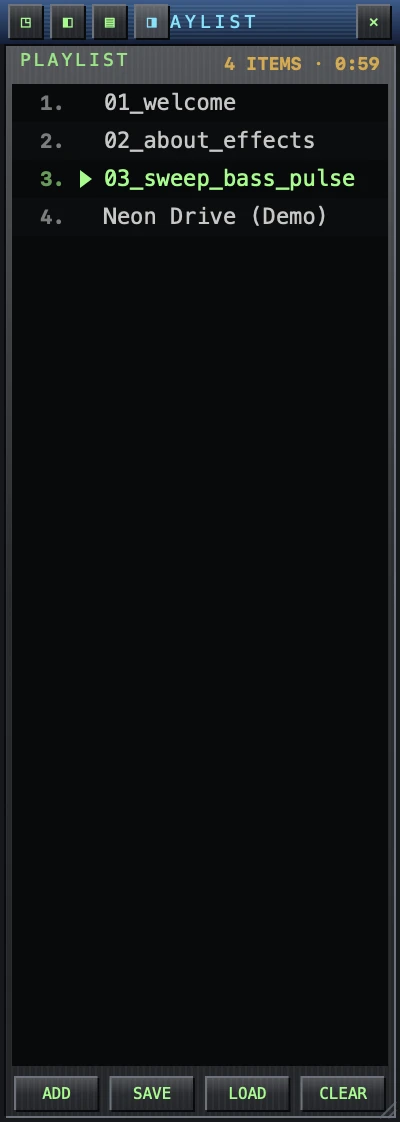
Working the list
- Toggle it with ⌘L or the PL button.
- Double-click a row to play it.
- Select many rows with ⇧-click / ⌘-click, then remove them with ⌫.
- Right-click a track for Play, Reveal in Finder and Remove from Playlist. With several rows selected, the last two say how many they will act on. Reveal greys out when there is nothing left on disk to show — a playlist outlives the files in it.
- ADD opens files; CLEAR empties the list.
Dock and detach
The playlist starts below the player and the two move as one window. It can sit on three sides, or on none:
| Below | The default — the list runs the full width of the player. |
|---|---|
| Left | Beside the player, on its left. |
| Right | Beside the player, on its right. |
| Floating | Its own window, anywhere on screen. |
Four small buttons at the right-hand end of the playlist’s title bar choose between them — each drawn as a little window with the docked edge filled in, so the picture says where the list will go. They fade in when the pointer reaches the bar rather than sitting on show, and each has a plain-English tooltip.
You can also just drag it: pull the playlist away to float it, drop it back against an edge of the player to snap it on. A docked playlist is kept on screen, so there is always an edge left to grab.
The ✕ at the end of that row hides the list; ⌘L or the PL button brings it back.
Playlist files (M3U / PLS)
Playlists are how you organize music in WaxSong — there is no library to import into; your files stay put and playlists point at them.
- LOAD (or just open an
.m3u/.m3u8/.plsfile) imports a playlist. - SAVE writes the current queue as an Apple-Music-compatible
.m3u8. The saved file becomes the list's name in the header.
Switch between playlists
Keep several playlist files in one folder — one per mood, genre, or set — and WaxSong turns that folder into your collection: once any of them is loaded, the ‹ › buttons in the playlist header jump straight to the previous or next playlist in the folder. No open dialog, no re-importing — one click and the whole queue swaps.
For this to see every playlist in the folder, macOS needs you to have handed WaxSong the folder once (drag it in, or pick it with ⌘O) — see Which files WaxSong can see.